videobox user manual
connecting microphones
connecting a camera
connecting a laptop
fazantix web ui
audio mixer settings
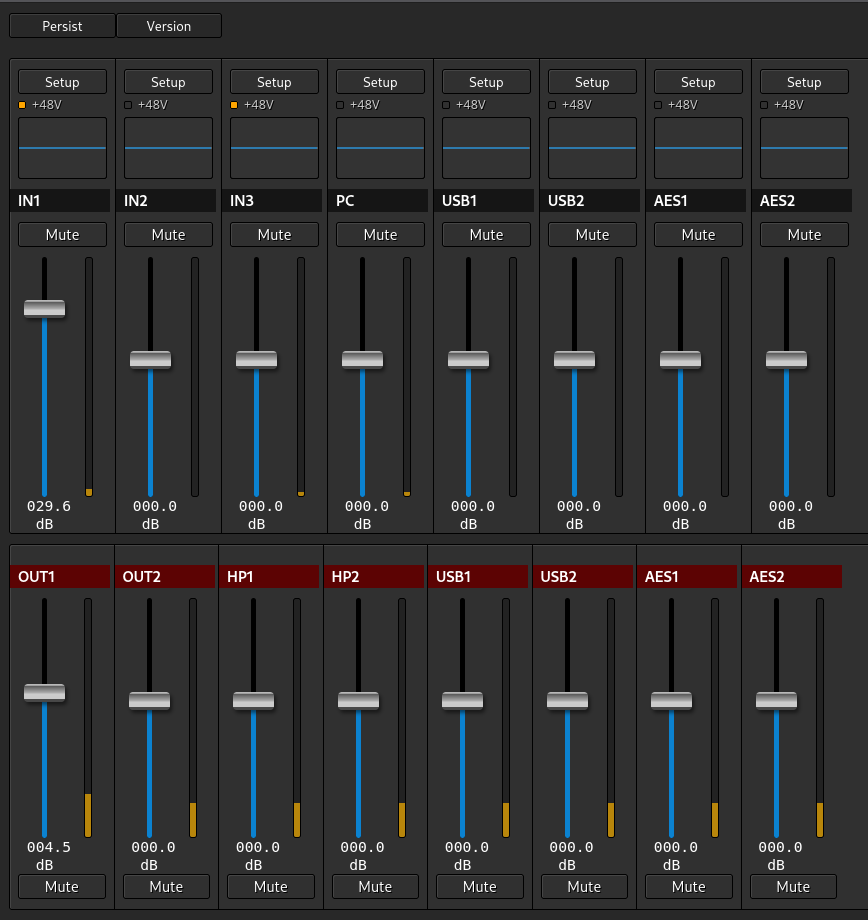
Web ui available at http://$BOX_IP/audioctl/?ws_url=/ws .
You can set all input and output levels.
inputs
IN1: XLR input connector 1
IN2: XLR input connector 2
IN3: XLR input connector 3
PC: HDMI IN audio (mono) input
USB1: input from Radxa X4 USB, left channel
USB2: input from Radxa X4 USB, right channel
AES1: AES3 protocol input (s/pdif), left channel (FUTURE: hardware extension required)
AES2: AES3 protocol input (~s/pdif), right channel (FUTURE: hardware extension required)
The audio mixer can provide 48V phantom power to XLR microphones. Use the “setup” button.
For all inputs, an equaliser is accessible via the per channel equaliser diagram.
outputs
OUT1
OUT2
HP1: mini jack headphone connector, left channel
HP2: mini jack headphone connector, right channel
USB1: output to Radxa X4 USB, left channel
USB2: output to Raxa X4 USB, right channel
AES1: AES3 protocol input (~s/pdif), left channel (FUTURE: hardware extension required)
AES2: AES3 protocol input (!s/pdif), right channel (FUTURE: hardware extension required)
beamer and stream output settings
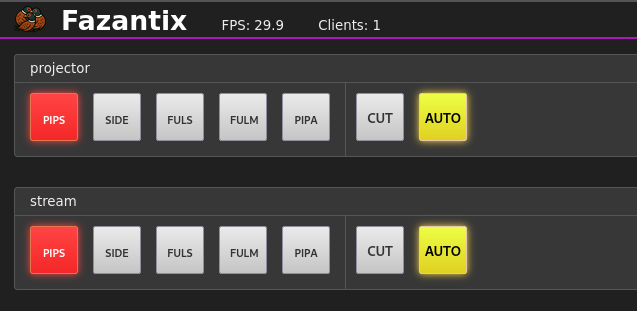
Web ui available at http://$BOX_IP/video .
You can separately set projector output and stream output here to:
PIPS (picture-in-picture, with slides large top left and cam small bottom right)
SIDE (slides and camera side-by-side)
FULS (slides full-screen)
FULM (cam full-screen)
PIPA (picture-in-picture, with camera large top left and slides small bottom right)